

🗓️ Book Your Mobile CI/CD Assessment Session!
Learn More       Talk to an Expert
Logo
  • Get in Touch
  • Mail İcon
    info@appcircle.io

Follow us on:

  • Github IconX IconYoutube IconLinkedIn IconReddit Icon
ISO 27001SOC2 Type2
LinkedIn IconLinkedIn IconLinkedIn IconLinkedIn IconLinkedIn Icon
  • Product
  • Features
  • Why Appcircle?
  • Meet Our Customers
  • Enterprise
  • Self-Hosted Appcircle
  • Local macOS Services
  • Integrations
  • Appcircle AI
  • Use Cases
  • Guides
  • Pricing
  • System Status
  • CLI
  • Community
  • Partners
  • Blog
  • Events
  • Whitepapers
  • Guides and Docs
  • CI/CD Maturity Report
  • Release Notes
  • How-to Videos
  • Slack Channel
  • Getting Started
  • Compare
  • Mobile CI/CD Tools
  • Appcircle vs App Center
  • Appcircle vs Appflow
  • Appcircle vs Bitrise
  • Appcircle vs Codemagic
  • Appcircle vs Xcode Cloud
  • Appcircle vs Jenkins
  • Company
  • Mission and Vision
  • Contact Us
  • Careers
  • Press Kit
  • Product
  • Features
  • Why Appcircle?
  • Meet Our Customers
  • Enterprise
  • Self-Hosted Appcircle
  • Local macOS Services
  • Integrations
  • Appcircle AI
  • Use Cases
  • Guides
  • Pricing
  • System Status
  • CLI
  • Community
  • Partners
  • Blog
  • Events
  • Whitepapers
  • Guides and Docs
  • CI/CD Maturity Report
  • Release Notes
  • How-to Videos
  • Slack Channel
  • Getting Started
  • Compare
  • Mobile CI/CD Tools
  • Appcircle vs App Center
  • Appcircle vs Appflow
  • Appcircle vs Bitrise
  • Appcircle vs Codemagic
  • Appcircle vs Xcode Cloud
  • Appcircle vs Jenkins
  • Company
  • Mission and Vision
  • Contact Us
  • Careers
  • Press Kit

Copyright © 2024 Appcircle Inc. All rights reserved.

Terms of ServicePrivacy PolicyCookie PolicyInformation Security PolicySecurity in Appcircle
Appcircle LogoAppcircle Logo
Product
featuresFEATURES

Unlock the full potential of Mobile CI/CD with Appcircle's powerful features

enterprise
Build

Effortlessly Automate Your Mobile App Builds

enterprise
Enterprise App Store

Enterprise Mobile App Store

enterprise
Signing Identities

Complete Signing Identity Management

enterprise
Re-sign Binaries

Mastering Binary Re-signing for App Security

enterprise
Testing Distribution

Comprehensive App Distribution for Testing

codepush
CodePush

Seamless OTA Update Process

enterprise
Publish to Stores

Automate App Store Publishing from Days to Minutes

Microsoft Intune App Releases
Publish to Intune

Streamline Microsoft Intune App Releases

featuresPLATFORMS

Explore the mobile platforms comprehensively supported by Appcircle

enterprise
iOS CI/CD

iOS Continuous Integration and Delivery (CI/CD)

enterprise
Android CI/CD

Android Continuous Integration and Delivery (CI/CD)

enterprise
React Native CI/CD

React Native Continuous Integration and Delivery (CI/CD)

enterprise
Flutter CI/CD

Flutter Continuous Integration and Delivery (CI/CD)

featuresINTEGRATIONS

Streamlined Integration with Hundreds of Ready Workflow Steps!

Sonarqube

Sonarqube

Danger

Danger

Fastlane

Fastlane

Tuist

Tuist

BrowserStack

BrowserStack

Resources
RESOURCESRESOURCES

Comprehensive documentation to support you at every stage of your Appcircle journey.

Learn

enterprise

Docs

enterprise

Blogs

enterprise

Events

whitepapers

Whitepapers

enterprise

Videos

Get Started

enterprise

Objective-C/Swift

enterprise

Java/Kotlin

enterprise

React Native

enterprise

Flutter

Guides

enterprise

Continuous Testing

enterprise

Advanced Caching

enterprise

Marketplaces

enterprise

API & CLI

CONNECT

enterprise

LinkedIn

enterprise

X

enterprise

Slack Community

Enterprise
RESOURCESENTERPRISE

Experience Appcircle's robust, enterprise-grade capabilities tailored for advanced needs

enterprise
Mobile CI/CD at Scale
enterprise
OpenShift
self-hosted
Self-Hosted
enterprise
Kubernetes
enterprise
Meet Our Customers
enterprise
Docker
enterprise
Why Appcircle?
enterprise
Podman
BlogPricingContact Us
Log in ➔Start for Free
  1. Home
  2. mobile-ci-cd-tools
  3. xcode-cloud
appcenter

Xcode Cloud

Xcode Cloud is a continuous integration and delivery (CI/CD) service built into Xcode, designed to automate the building, testing, and distribution of apps for Apple platforms.

What is Xcode Cloud?

Xcode Cloud is a CI/CD service integrated into Xcode, Apple's official IDE. It is tailored for developers building apps for iOS, macOS, watchOS, and tvOS. Xcode Cloud automates key tasks such as building apps in the cloud, running tests on simulated devices, and distributing builds to testers or the App Store. This service simplifies the development workflow by handling the complexities of integration and delivery, allowing teams to focus more on coding and innovation.
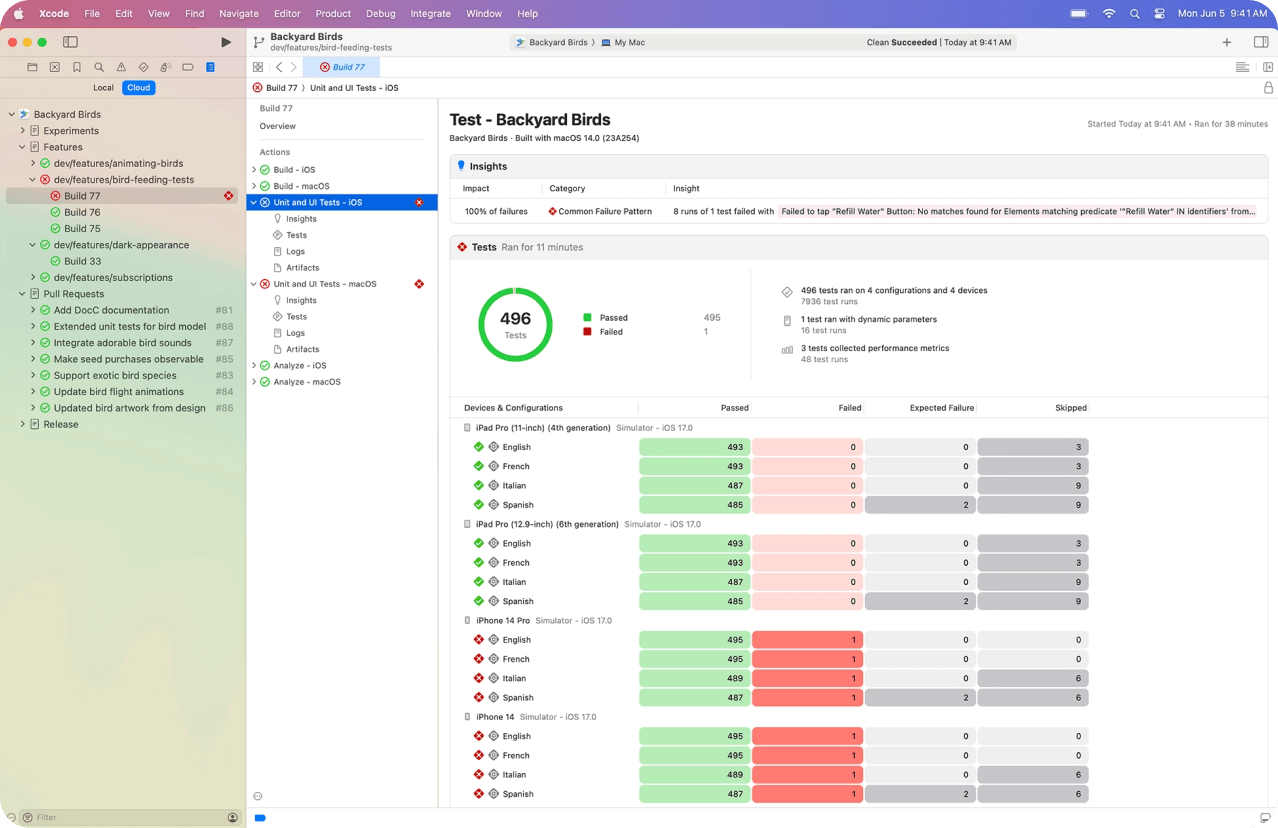
xcode cloud dashboard

Top Alternatives to Xcode Cloud

topchoice
Appcircle logo

Appcircle

  • Enterprise-grade all-in-one mobile CI/CD platform.
  • Supports both self-hosted and cloud deployment options.
  • Includes Testing Distribution and Enterprise App Store modules.
  • Ideal for enterprises with complex security and mobile CI/CD requirements.
  • IAM & SSO support (OpenID & SAML) for secure access control.
  • Advanced build configuration with customizable workflows.
  • Offers multi-tenancy for advanced organization management.
  • Advanced Signing Identities management.
  • Provides enterprise-grade logs and detailed reporting.

Others

appflow logo

Appflow

Appflow lacks customizable build workflows, does not offer fine-grained access control, and supports only limited deployment options, which may restrict flexibility for larger teams or complex project needs.

bitrise logo

Bitrise

Bitrise offers a limited publishing flow, lacks a self-hosted deployment option, and does not include signing identity management, which might impact flexibility and control for some teams.

codemagic logo

Codemagic

Codemagic offers more limited customization options, does not support self-hosted deployment, and provides only basic testing distribution capabilities.

FAQs

+

What is Xcode Cloud?

  • Xcode is Apple's integrated development environment (IDE) used for developing software for macOS, iOS, watchOS, and tvOS. It provides a comprehensive suite of tools for coding, debugging, and designing user interfaces. Xcode includes a source code editor, a graphical user interface editor, a debugger, and a simulator for testing apps on different Apple devices. It also supports version control systems and integrates with various Apple services, making it the primary tool for developers creating apps for Apple's platforms.

+

How to Use Xcode Cloud?

  • To use Xcode Cloud, you need an Apple Developer account and Xcode 13 or later. Enable Xcode Cloud in the Apple Developer portal, configure your Xcode project for cloud workflows, and create a CI/CD workflow specifying actions for building, testing, and distributing your app. Commit and push changes to a Git repository integrated with Xcode Cloud to automate builds and tests. Monitor progress and review results in the Xcode Cloud dashboard, and configure distribution to TestFlight or the App Store. While Xcode Cloud offers a convenient solution for Apple app development, platforms like Appcircle provide greater flexibility with access to workflow-ready integration steps, support for testing distribution, and flexible publish store automation, allowing for a more comprehensive mobile app CI/CD pipeline.

+

What is the difference between Xcode and Xcode Cloud?

  • Xcode is an integrated development environment (IDE) used for developing software for Apple's platforms, providing tools for coding, debugging, and designing user interfaces. Xcode Cloud, on the other hand, is a continuous integration and delivery (CI/CD) service that automates the process of building, testing, and distributing apps to App Store. While Xcode is a local development tool that runs on a Mac, Xcode Cloud is a cloud-based service that integrates with Xcode to enable automated workflows for app DevOps, allowing for more efficient collaboration and faster app releases.

+

Do I need a Mac for Xcode Cloud?

  • Yes, to use Xcode Cloud effectively, you'll need a Mac. While Xcode Cloud itself is a cloud-based CI/CD service that runs on Apple's infrastructure, you'll still need a Mac to publish your iOS or macOS apps, create and configure your Xcode projects, and initiate workflows in Xcode Cloud. This requirement can be a limitation for developers who don't have access to a Mac. In contrast, Appcircle offers a more flexible solution, allowing you to build and distribute iOS apps without the need for a Mac, providing a more accessible and cost-effective option for mobile app DevOps process.

+

Can I use Xcode Cloud on Windows?

  • No, Xcode Cloud cannot be used directly on Windows. Xcode Cloud is designed to work with Xcode, Apple's integrated development environment (IDE), which is only available on macOS. To use Xcode Cloud, you need a Mac to develop your iOS or macOS apps and configure your Xcode projects. However, for developers working on Windows, Appcircle offers a solution that allows you to build and distribute iOS apps without the need for a Mac, making it a more accessible option for cross-platform DevOps process.

+

Is Xcode Cloud compatible with Android?

  • No, Xcode Cloud is not compatible with Android. It is specifically designed for building, testing, and deploying apps for Apple's platforms, including iOS, macOS, watchOS, and tvOS. For Android app development, developers typically use different tools and services, such as Android Studio for development and various CI/CD platforms that support Android builds. In contrast, Appcircle provides a comprehensive solution for both iOS and Android, offering automated workflows, testing, and store deployment features for both platforms, making it a more versatile choice for cross-platform development projects.

+

Is there a self-hosted option for Xcode Cloud?

  • No, Xcode Cloud does not offer a self-hosted option; it is exclusively a cloud-based CI/CD service provided by Apple. This means that while it provides a convenient and integrated solution for iOS and macOS app development, it may not meet the needs of organizations with specific requirements for data privacy, security, or regulatory compliance that necessitate on-premises. In contrast, Appcircle provides the flexibility of both cloud-based and self-hosted solutions, allowing organizations to choose the deployment option that best fits their needs, making it a more adaptable choice for businesses with stringent hosting requirements.

+

Can I use Xcode Cloud for free?

  • Xcode Cloud offers a limited free tier, allowing you to try out some of its features without cost. However, to access more advanced features, increased build time, and additional concurrency, you'll need to subscribe to one of their pay as you go subscription plans. The free tier is typically suitable for small projects or for evaluation purposes. It's important to note that as your project grows, you may need to upgrade to a pay as you go subscription plan to meet your development needs. In contrast, Appcircle provides a transparent and fixed pricing model, ensuring that you have access to a comprehensive set of features without unexpected costs, making it a more cost-effective solution for your mobile app DevOps needs.

+

How Does Xcode Cloud Compare to Other CI/CD Tools?

  • Xcode Cloud is specifically designed for Xcode and Apple's tools like TestFlight and App Store Connect. It is only compatible with Apple platform apps and provides a cloud-based solution. Other CI/CD tools, like Appcircle, support additional platforms such as Android and multi-platform projects, offer more flexibility overall, and include a self-hosted deployment option.

Appcircle vs. Xcode Cloud

Compare Appcircle with Xcode Cloud as Mobile CI/CD and DevOps tools and discover how Appcircle stands out.

appcircle build module

Build

Appcircle’s robust infrastructure and clean build architecture deliver consistently fast, reliable builds. Advanced caching and up-to-date stack management significantly reduce build times and save developer hours. With customizable workflows, 100+ ready integrations and seamless Git connections, teams accelerate mobile app delivery with no YAML complexity.

Learn more about Build
appcircle signing identities module

Signing Identities

Centralize all app signing identity management in one secure dashboard with no need to switch to the Apple Developer Portal. Easily generate, renew, and track Certificates, Identifiers, Profiles, Keystores, and Apple device registrations automatically. Proactive expiration alerts, auto renewal, and detailed activity logs keep your mobile CI/CD workflows secure and uninterrupted.

Learn more about Signing Identities
appcircle testing distribution module

Testing Distribution

Effortlessly distribute iOS and Android binaries, manage testers, and automate your entire app test distribution process. It offers native plugins for CI/CD tools like Fastlane, GitHub Actions, Jenkins, and Visual Studio, along with CLI and API support. An intuitive tester portal, multi-channel delivery, SSO/LDAP authentication, and detailed reporting ensure a smooth testing experience.

Learn more about Testing Distribution
appcircle resign binary feature

Re-sign Binary

Appcircle lets you re-sign iOS and Android binaries manually or automatically. You can update your app’s certificate or keystore, change the app name, icon, version info, entitlements, provisioning profiles, and embedded certificates. This keeps your apps secure and up-to-date without a full rebuild, even when transferring app ownership to a new developer account or updating an existing application, while maintaining full traceability and compliance.

Learn more about Re-sign Binary
appcircle logoarrowxcode-cloud logo
appcircle publish module

Publish to Stores

Automate app store releases and manage submissions to App Store, Google Play, Huawei AppGallery, Microsoft Intune, and TestFlight from a single dashboard—no need to switch between different store platforms like App Store Connect or Google Play Console. Customize publish flows with drag-and-drop design and custom script support. Automate metadata updates and re-signing, keeping everything transparent with detailed activity logs and access controls.

Learn more about Publish to Stores
appcircle CodePush feature for React Native apps

CodePush

Deliver secure, seamless OTA updates for your React Native apps with Appcircle CodePush. Integrate with your CI/CD pipeline, push real-time changes to users without requiring app store resubmission, manage controlled rollouts, instantly roll back updates, and enhance security with code signing, package diff, code obfuscation, self-hosted options, and enterprise-grade reporting.

Learn more about CodePush
appcircle enterprise app store module

Enterprise App Store

Distribute internal iOS and Android apps securely through your own branded store, without MDM. Support in-app (over-the-air) updates for seamless user experiences. Integrate natively with CI/CD tools like Fastlane, GitHub Actions, Jenkins, and Visual Studio. Manage access with SSO/LDAP, use custom domains, and track installs with detailed reports for a secure app delivery experience.

Learn more about Enterprise App Store
Publish to Microsoft Intune

Publish to Microsoft Intune

Easily publish your mobile applications directly to Microsoft Intune within your automated release workflow. Register your app with the Microsoft Identity Platform and provide your credentials for secure publishing. Keep your business apps up-to-date by submitting new builds and updating app metadata on Intune, all managed seamlessly through Appcircle’s Publish module.

Learn more about Intune integration
Multi-tenancy for mobile CI/CD

Multi-tenancy

Segment teams into independent sub-organizations to improve security and operational efficiency. Advanced role management lets you assign module-specific permissions to every user, making it easy to control access, manage responsibilities, and maintain security across multiple teams and projects, even as your organization scales.

Learn more about Multi-tenancy
appcenterappcenterxcode-cloud
SSO/LDAP Support

SSO/LDAP Support

Appcircle offers enterprise-grade security with seamless integration to identity providers like Okta, Azure AD, and OneLogin using standard protocols such as OpenID Connect, SAML, and LDAP. The platform enables dynamic role and permission assignments based on identity provider groups, supporting fine-grained access control through role mapping via SSO and LDAP.

Learn more about SSO/LDAP Support
Appcircle Deployment Options

Deployment Options

Every enterprise has unique needs. Appcircle supports Public Cloud, Private Cloud, Hybrid, and on-premise deployments. Its portable, container-based architecture lets you deploy on GCP, AWS, Azure, or within your own Kubernetes, OpenShift, Podman, or Docker environment. Choose the deployment setup that best fits your business requirements.

Learn more about Self-Hosted Appcircle
Ready to use CI Plugins for Appcircle

Ready to use CI Plugins

Seamless integration with your existing DevOps tools is easy with Appcircle. Take advantage of ready-to-use plugins for Azure DevOps, GitHub, Fastlane, Jenkins, and more. With full API and CLI support, you can easily connect Appcircle’s distribution modules to your workflows, automate the entire process, and ensure reliable, scalable app delivery.

Learn more about CI Plugins
Activity Log & Reports

Activity Log & Reports

Track every action across all modules with detailed activity logs and enterprise-grade reporting. Appcircle provides full visibility into build, signing, testing, enterprise distribution, and publishing operations, helping you meet security and compliance requirements. Keep your workflows secure, auditable, and fully transparent at every stage.

iconheader

Appcircle

iconheader

Xcode-Cloud

iOS Builds (Objective-C / Swift) Support

Yes

Yes

Android Builds (Java / Kotlin) Support

Yes

No

React Native Builds Support

Yes

No

Flutter Builds Support

Yes

No

.Net MAUI Builds Support

Yes

No

Xamarin Builds Support

Possible by using custom scripts

No

Unity Builds Support

No

No

Hybrid/Ionic Builds Support

Possible by using custom scripts

No

Apple Silicon Build Machine Support

Yes

Yes

Supported Git Providers

Azure DevOps Services Cloud, Azure DevOps Server, GitHub, Bitbucket, Bitbucket (Self-Hosted), GitLab, GitLab (Self-Hosted)

GitHub, GitHub (Self-Hosted), Bitbucket, Bitbucket (Self-Hosted), GitLab, GitLab (Self-Hosted)

External Custom Git Repository Support

Yes

Yes

Automated Builds with Git Push

Yes

Yes

Automated Builds with Git Tag

Yes

Yes

Continuous Integration Pipeline

Yes

Yes

Advanced Build Configuration with Workflows

Use workflow steps that are tailored and maintained for mobile development.

Usage between custom pre-action, action, post-action

Workflow Components Marketplace

Yes

No

Build Configuration with YAML/JSON

Yes

No

Custom Script Support

Ruby and Bash

No

Centralized Environment Variables

Yes

Yes

Unit and UI Test Support

Yes

Yes

Unit and UI Testing Report

Yes

No

Selectable Xcode Version

Yes

Yes

Android Multiple Flavor Dimension Support

Yes

No

Insight

In Roadmap

No

Centralized Signing Identity Management

Yes

No

Online iOS Certificate Creation Interface

Yes

Yes

Online Keystore Creation Interface

Yes

No

Ad Hoc Device Registration

Yes

Yes

Apple Device Management

Yes

Yes

App Testing Distribution

Yes

Yes

Testing Group Support

Yes

Only TestFlight internal and external

Tester Authentication with Email

Yes

No

Tester Authentication with Static Credentials

Yes

No

Tester Authentication with Enterprise Identity

Yes

No

Publish to Apple App Store and TestFlight

Yes

Yes

Publish to Google Play

Yes

No

Publish to Huawei AppGallery

Yes

No

Publish Flow Customization

Yes

No

Publish In-House with Enterprise App Store

Yes

No

Deployment Options

Public Cloud, Private Cloud,
On-premise, AWS (Amazon Web Services), GCP (Google Cloud Platform), Azure

Public Cloud hosted on Apple's infrastructure, no private cloud or on-premise options.

Team Management

Yes

Yes

Fine-Grained User Roles and Permissions

Yes

Yes

SSO (Single Sign-On) Login

Yes

No

LDAP Group/Role Mapping

Supports LDAP group/role mapping, enabling seamless integration with your organization's directory services for effective and automated tester group management.

No

2FA Support

Yes

Yes

Enterprise-Grade Logs/Reports

Yes

No

Pricing Model

Fixed, Transparent Pricing

Pricing based on compute hours/month

Disclaimer

The views and opinions expressed in this blog post are those of the authors. Any content provided by our bloggers or authors is of their opinion and are not intended to malign any organization, company, individual or anyone or anything. This comparison is based on their review of the product for market research purposes

Click here to view more mobile CI/CD software comparisons.

Switching to another CI/CD tool can be a complex decision. Switching to Appcircle is easy,however we've prepared this comparison to help you decide easier.

Discover more!

We're here to discuss how Appcircle can enhance your mobile development workflow. Feel free to reach out! We usually respond within a business day.

This information was last updated in Q1 2025

Join Our Newsletter

Get informed about news, new releases, and mobile DevOps.